
Primary and Sub-systems
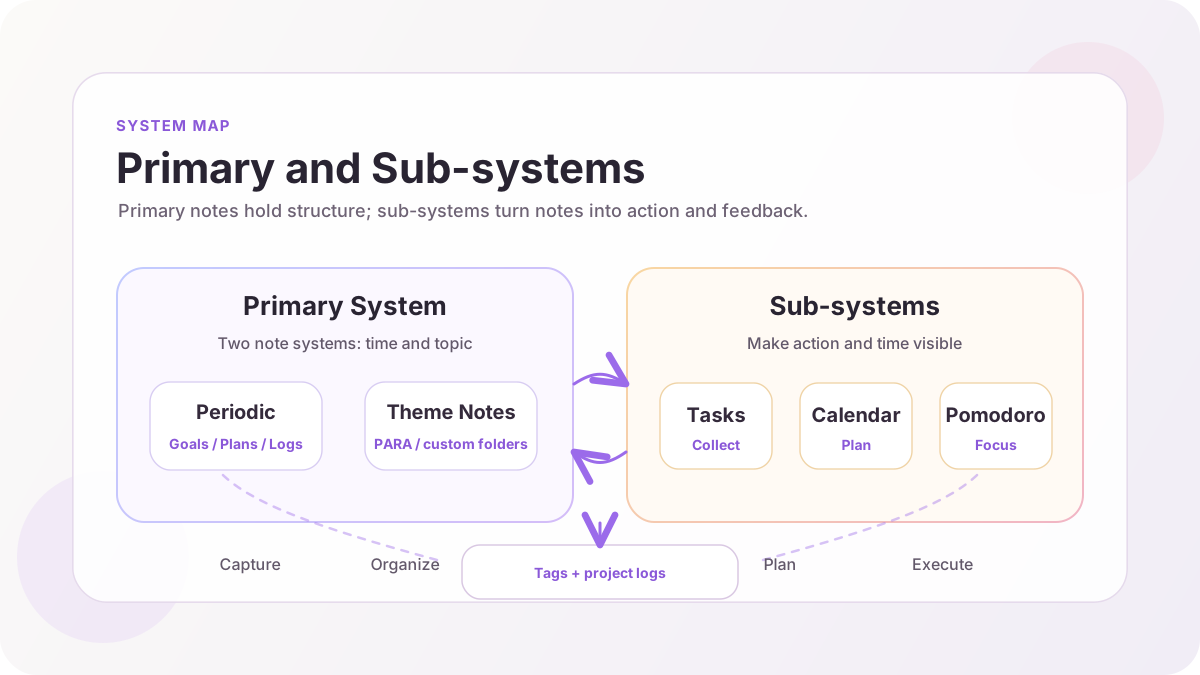
The LifeOS architecture is divided into the primary system and sub-systems. The primary system is the core note-taking framework, while sub-systems are auxiliary tools that serve the primary system.
Primary System
The primary system consists of two note systems that cover your life and work from two dimensions: time and topic.
Periodic Notes (Time Dimension)
Periodic Notes are organized into three tiers by time granularity:
Long-term Notes -- Goal Management
- Yearly notes: Set annual goals at the beginning of the year. You can plan from the Key Focus Areas dimension or the Role Dimension, maintaining a sense of direction throughout the year.
- Quarterly notes: Break down annual goals into quarterly milestones, serving as a roadmap for achieving annual goals.
Due to the large time span and low predictability, long-term notes are not suitable for planning specific tasks. They are better suited for goal management -- clarifying direction rather than detailing steps.
Short-term Notes -- Task Management
- Monthly notes: Break down and organize tasks to be completed this month based on the goals in your quarterly notes.
- Weekly notes: Select tasks from monthly notes and plan specific to-dos for the week.
Short-term notes convert goals into actionable tasks, bridging the gap between "what I want to do" and "what I'm doing."
Daily Notes -- Recording
- Daily notes: Capture ideas, log progress, and track project time anytime, anywhere.
The daily note is the information entry point for the entire system. You don't need to worry about where to record something -- just add a theme tag in your daily note, and the system will automatically index it to the corresponding Theme Note.
Theme Notes (Topic Dimension)
Theme Notes typically use PARA classification, arranged from lowest to highest actionability:
Aino LifeOS also supports moving away from PARA and using custom folder structures to organize Theme Notes. PARA is just a recommended starting point, not a mandatory requirement.
Sub-systems
Sub-systems are auxiliary tools that serve the primary system. They span across Periodic Notes and Theme Notes, helping you manage tasks and time more efficiently.
Task Management
Tasks are scattered across various notes -- daily notes, weekly notes, and Theme Notes can all contain tasks. The sub-system handles:
- Task collection: Create tasks with
- [ ] task descriptionin any note, just add a theme tag - Task indexing: The system automatically aggregates all tasks, viewable in the task panel
- Task tracking: Filter and manage by status, tag, due date, and other dimensions
Calendar
The calendar visualizes tasks and schedules on a timeline:
- Supports CalDAV and Google Calendar sync
- Create and manage task due dates directly on the calendar
- Unify external calendar data with tasks in your notes
Pomodoro Timer
The Pomodoro timer helps you focus on the current task:
- Time tasks and track actual time spent on each project
- Time data can be reviewed in weekly, monthly, and other notes
Connecting the Primary System and Sub-systems
The primary system and sub-systems are interconnected in the following ways:
Connected via Tags
Theme Tags are the core link between the two systems. As long as a task recorded in your daily note carries a theme tag, it will be indexed to the corresponding Theme Note. For example:
This task appears both on the daily note's timeline and will be indexed to the "Personal Brand" Theme Note.
Connected via Projects
Projects are another important bridge connecting the time dimension and the topic dimension:
- Project snapshots: Record project progress and time spent in daily notes
- Project time statistics: Weekly, monthly, quarterly, and yearly notes can show the time proportion for each project within that period
- Project review: Regularly review project progress in periodic notes to ensure you're on the right track
Information Flow Direction
Overall, the information flow path in the system is:
The daily note is both the entry and exit point -- you capture information in your daily note, which is automatically organized into Theme Notes via tags. You plan and review in periodic notes, and ultimately execute and record in your daily note again.
Next Steps
- Quick Start -- Install Aino LifeOS and create your first note