
Habit Statistics
Habit Statistics reads Markdown checkboxes under a configured heading in your daily notes, then summarizes completions, streaks, and trends. The feature is available by default in a new regular vault, while the built-in PARA, GTD, IPO, Memos, and OPC example templates keep it disabled and provide no preset habits. Your system should start with your habits, not someone else's checklist.
1. Enable the Feature
Open Settings → Notes → Periodic Notes → Periodic Notes:
- Turn on Habit Statistics.
- Set Habit Header to
Habit, or use your own heading. - Confirm that the daily-note folder and template path are correct.
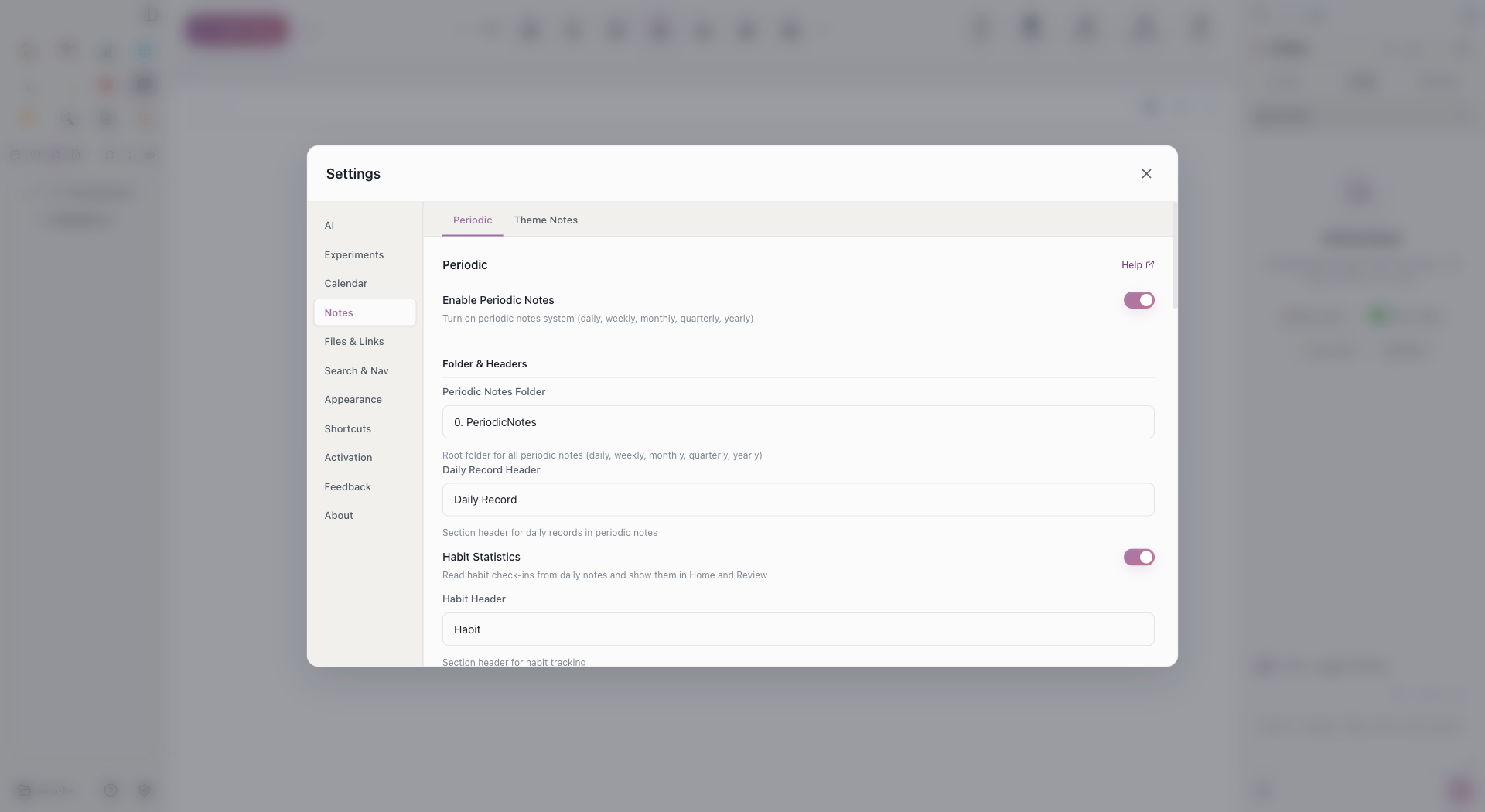
The habit header defines the section Aino reads. The level-two heading in your template must match this value, or regular tasks may be counted as habits while real habits are missed.
2. Configure the Daily Template
Open a daily note, click Edit Template in the top toolbar, and add this section to the template:
- [ ] Morning stretchis a daily habit. Check it once for that day.- Each checked
+1item underWateradds one completion to a counting habit. - Start with two to four behaviors that matter. A shorter template is easier to sustain.
This is standard Markdown checkbox syntax. It does not depend on Obsidian Tasks, Dataview, or another plugin, so the same template works in both Aino Desktop and Obsidian LifeOS Pro.
3. Check In and Review Trends
Check off habits in each daily note, then open Habit Statistics from Home to review the trend. Aino reads daily notes from the periodic-notes folder and aggregates the configured section.
When Habit Statistics is turned off:
- The habit-header field is hidden in Settings.
- Home no longer shows the habit-statistics entry or data.
- AI Review excludes habit check-in evidence.
- Existing Markdown records remain untouched and can be analyzed again after re-enabling the feature.
4. Reuse the Template in Obsidian
The Markdown template can be shared directly, but Aino Desktop and Obsidian LifeOS Pro store their feature switches independently. When opening the vault in the other workspace, enable Habit Statistics there and use the same habit header.
Troubleshooting
Check that Habit Statistics is enabled, the heading matches exactly, the daily note is inside the periodic-notes folder, each item uses a standard Markdown checkbox, and the current note has been saved.
Continue reading: Periodic Notes · AI Review