
Theme Notes
Theme notes are the basic unit of LifeOS. Every topic in your life and work -- whether it's a project with a deadline, an area requiring ongoing attention, or a topic you're interested in -- can be managed as a theme.
Where to Create in the App
- Aino Desktop: Click Create Theme in the top toolbar. If you are not sure when a theme is needed, the question mark in the form opens the core concept guide.
- Aino Desktop settings: Open Settings → Periodic Notes → Theme Notes to configure theme folders, PARA categories, index file mode, and theme template variables.
- Obsidian: A theme is still Markdown files and tags. You can edit
Template.mdin project, area, or resource folders directly, then return to Aino to create the theme.
Understanding Theme Notes
Each theme note has a unique theme tag as its identifier. Tag any note with this theme tag, and related tasks, bullets, and files are automatically collected in the theme note's index file.
This is the core of LifeOS's "low-pressure recording": just jot things down in your daily notes with a tag, and you can find all related content in the theme note later.
PARA Directory Structure
LifeOS uses the PARA method by default to organize theme notes. Here is the actual directory structure from the example vault:
We recommend flattening theme directories: every theme folder under Projects, Areas, Resources, or Archives should sit directly under its category folder, without another theme-directory level. Aino flattens / in a hierarchical tag to - in the folder name. For example, #健康/运动 maps to 2. 领域/健康-运动/. This lets the same theme move between Projects, Areas, Resources, and Archives by moving one folder, without reorganizing parent and child directories.
PARA Four-Category Overview
Additionally, there are two auxiliary directories:
- -1. Capture -- Unsorted temporary content; capture first, organize later
- 5. Expression -- Output refined from resources and areas
Theme Note Templates
Each category directory has a Template.md that is automatically used when creating new theme notes.
Project Template
Each theme note automatically indexes via three LifeOS code blocks:
Area Template
The area template adds ArchiveListByTag to display archived projects under that area.
Create a Theme Note
- Switch to "Theme Notes" in the top-left form
- Enter a theme tag (e.g.,
#个人品牌/WOT-分享会) - Select the target category (Project/Area/Resource)
- A single-level theme folder and index file are created with the template pre-filled; for example,
#个人品牌/WOT-分享会creates1. 项目/个人品牌-WOT-分享会/
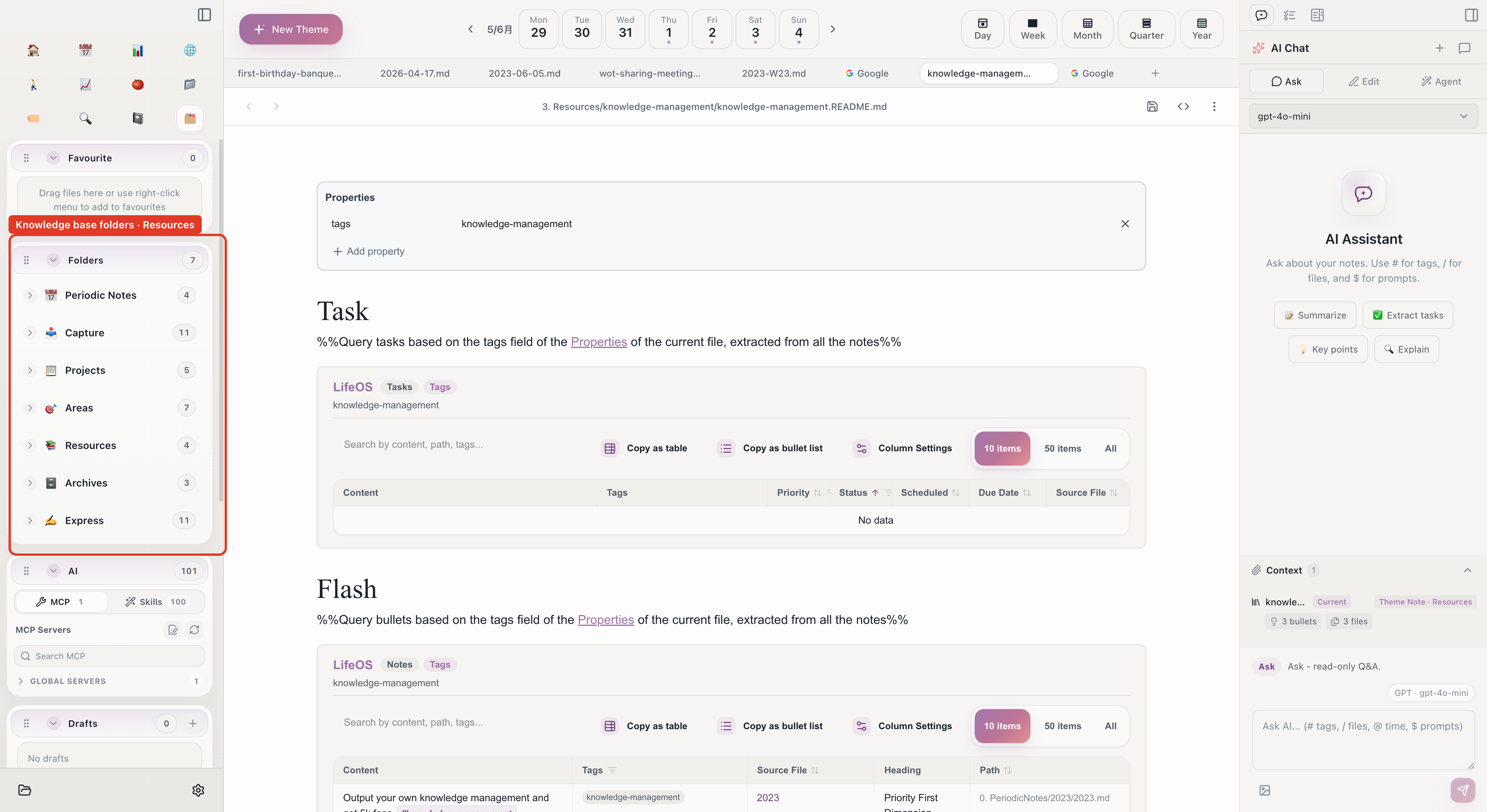
Manage Note Lifecycle
PARA's core principle is "actionability" -- note categories change over time:
When a Project Completes
- Confirm all tasks in the project are done
- Move the entire project folder to
4. 存档/ - The project disappears from the home view but remains searchable
Periodic Review
Spend 15 minutes monthly reviewing your PARA:
- Are there completed projects that haven't been archived?
- Should any areas be downgraded to resources?
- Have any resources actually become active projects?
PARA is just one way to organize theme notes. You can customize your workflow and create different directory structures based on your needs. The key is theme tags -- regardless of folder organization, tags are the thread that connects everything.
Use "Flash Roaming"
Click the "Flash Roaming" button and Aino LifeOS randomly surfaces your historical notes -- helping you rediscover forgotten ideas and spark new connections.
Related
- Periodic Notes -- Theme notes provide the spatial dimension; periodic notes provide the time dimension
- Full-Text Search -- Quickly locate any note
- Task Management -- Tasks in projects are automatically collected
- Connection -- Learn how the two systems are linked via tags
- Project Lifecycle -- The full flow from project creation to archival