
From a Second Brain to an AI Work System: Building Aino on LifeOS
LifeOS had already come a long way
I did not start building LifeOS with the current AI wave. I first published my Obsidian-based personal workflow on GitHub. At the time of writing, the open-source edition has earned 1,000+ GitHub stars, cumulative downloads have passed 50,000, and the paid edition has more than 1,000 users. In 2024, LifeOS for Obsidian also won third place in the Best Template category of the Obsidian Gems of the Year awards.
To me, the numbers are not the whole story. What matters more is that people use LifeOS for daily capture, tasks, projects, calendar planning, and periodic review. I owe its progress to years of real use, feedback, and affection from the community.
I summarize the method in one sentence: “Start with daily capture, then connect tasks, projects, calendar planning, and reviews so nothing lives only in your head.” On the LifeOS homepage, I introduce six foundations of the community edition: ready-to-use setup, stress-free recording, quick retrieval, periodic notes, knowledge management, and a dedicated plugin. I was never trying to solve one isolated feature. I wanted to turn daily information into a personal system that remains retrievable, connected, and actionable.
On top of that foundation, I use real product interfaces to show how LifeOS Pro and DeepAsk turn the method into daily tools:
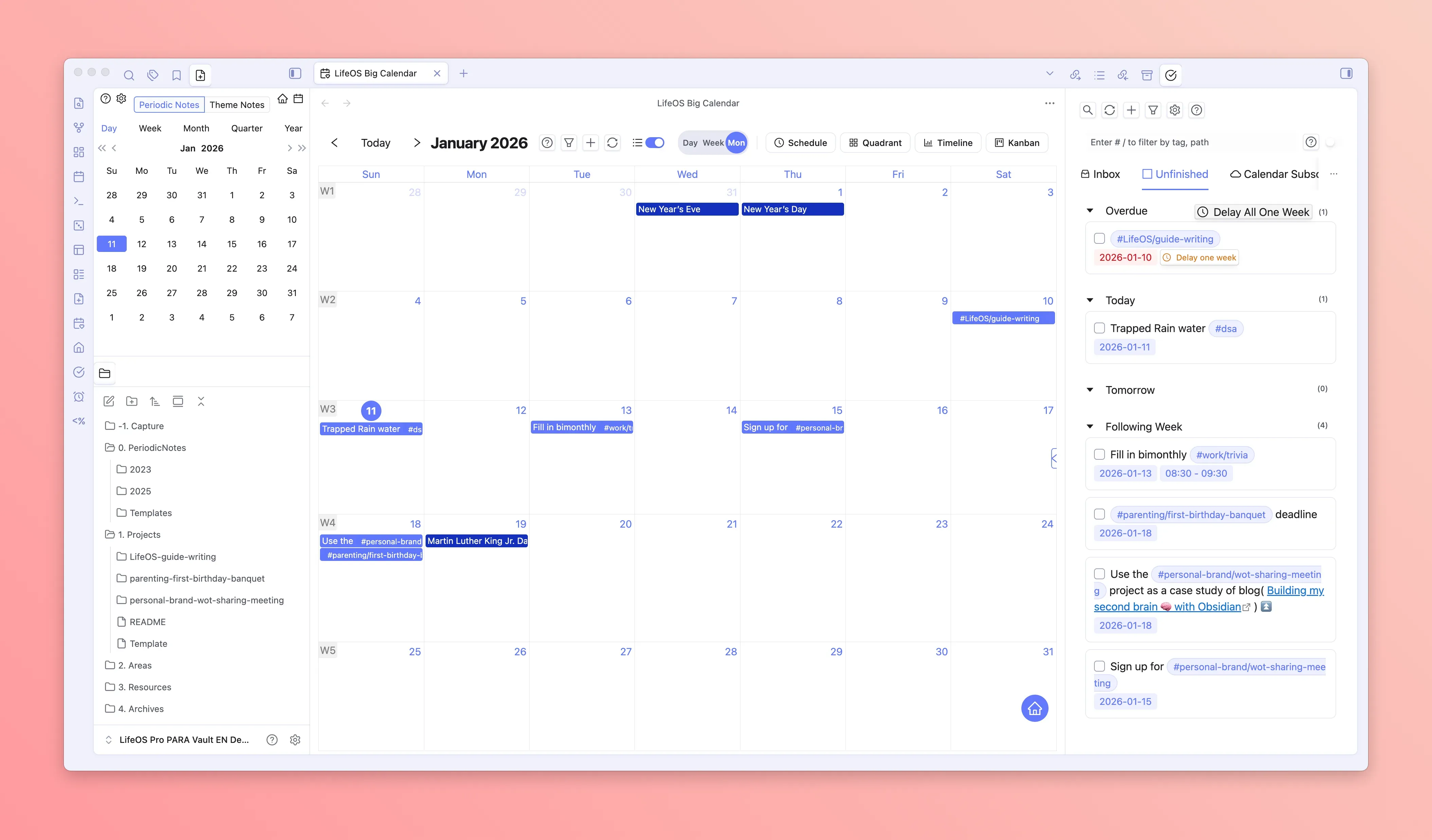
Schedule planning: give tasks a real place in time
I added the big calendar to LifeOS Pro so you can drag tasks into time, plan deadlines, and move between month, week, schedule, quadrant, Kanban, and timeline views. Remote calendars can also be managed in the same workspace when needed.
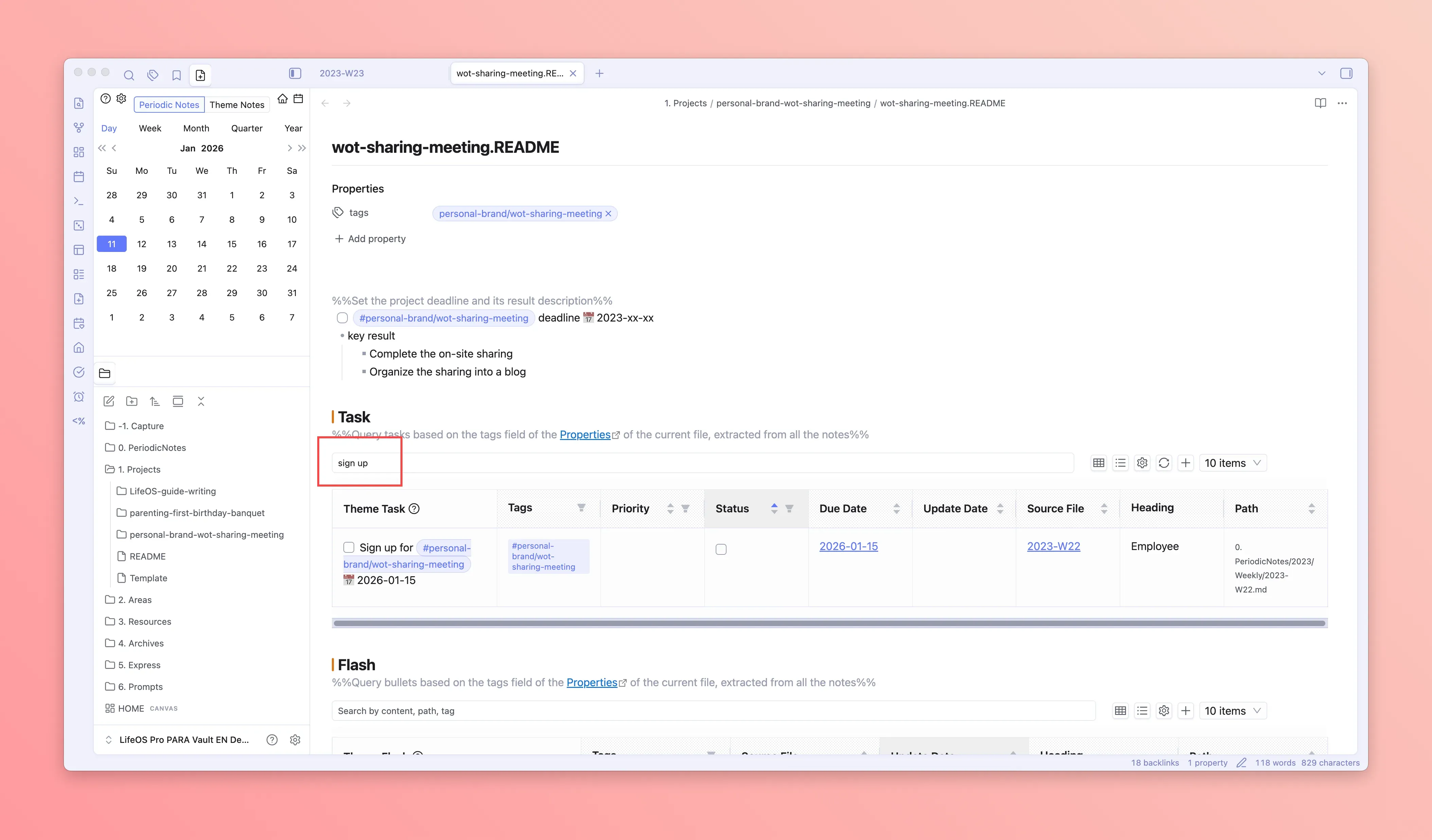
Advanced lists: retrieve action from scattered Markdown
Files, tasks, and bullet notes should not lose their relationships simply because they live in different notes. I therefore added search, sorting, filters, and pagination to advanced lists so you can locate work by topic and state.
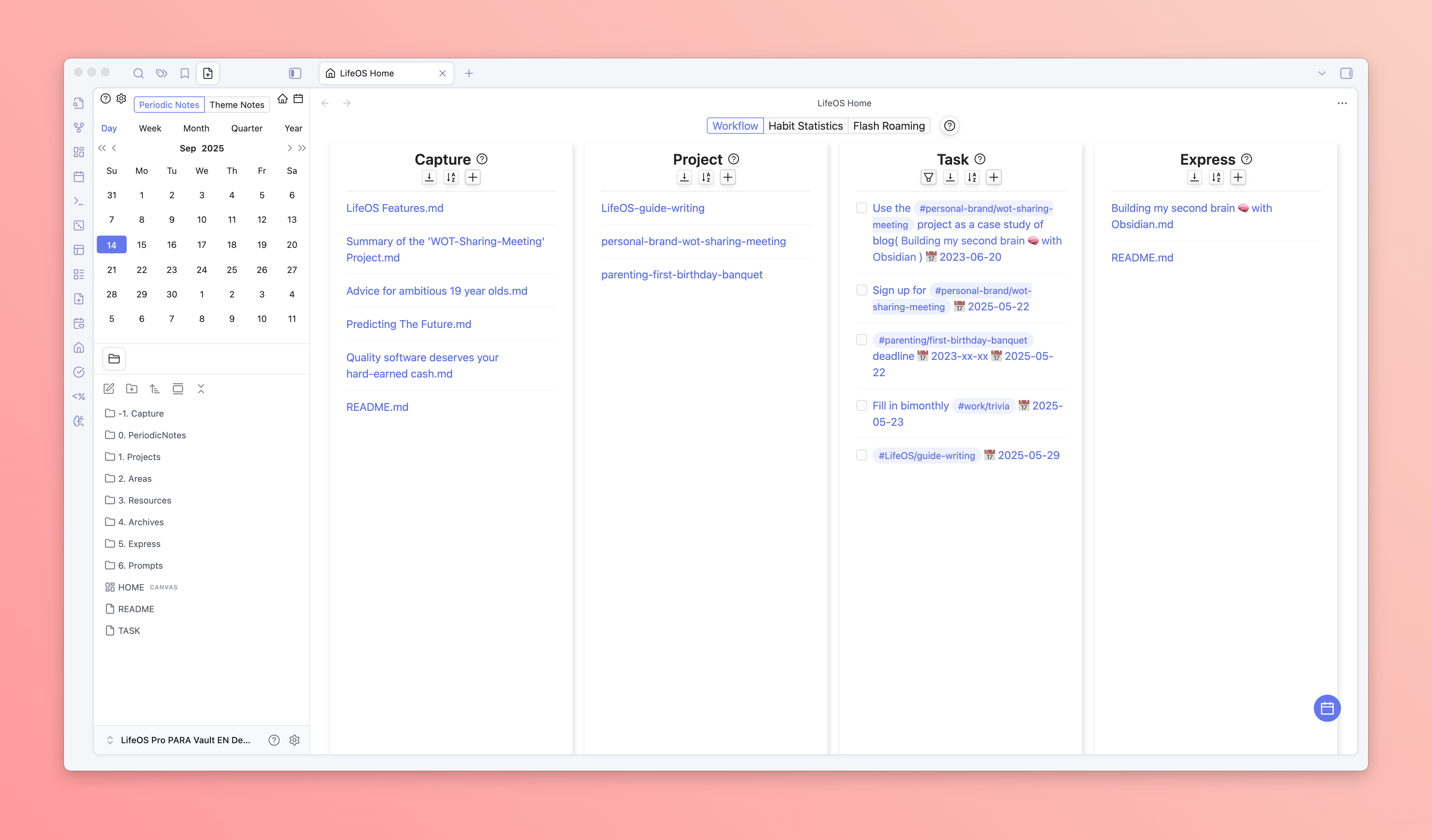
Home view: connect capture, projects, tasks, and output
I also brought capture, projects, tasks, and expression into one Home view, alongside habit statistics and flash roaming. I wanted LifeOS to become more than a folder structure: an operating surface you can return to every day.
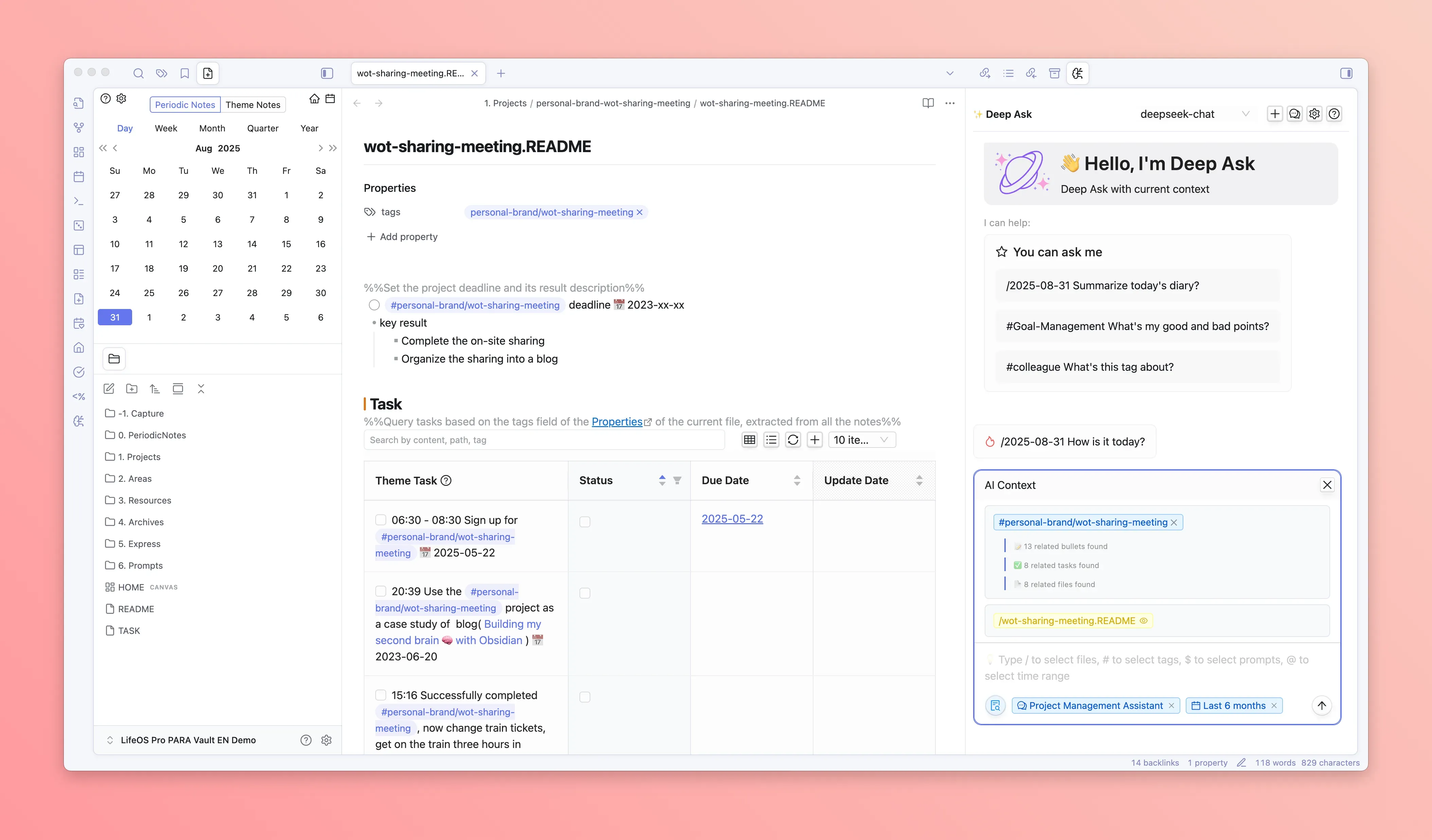
DeepAsk AI: let notes participate in thinking
Before building Aino, I had already explored contextual AI through DeepAsk. It could converse around the current note, tags, files, and time ranges, so AI was not limited to generic answers and could instead work with material related to the task at hand.
Together, these features formed the first stage of my work on LifeOS: capture information, establish structure, schedule action, review progress, and begin involving AI in understanding. They also showed me the next question: if AI is no longer just a plugin panel—if it should organize, execute, review, and even generate purpose-built tools—how should I redesign the product around it from the ground up?
This path predates Aino. In 2023, I published an article about my Obsidian recipe for building a second brain. The article already documented LifeOS as it existed then. I compared the human brain to a CPU and the second brain to external storage: the brain stays focused on the present, while the note system preserves context that does not need immediate attention but must remain retrievable.
I continued developing LifeOS along that method. Periodic notes organize time. Topic notes organize projects, areas, and knowledge. Tasks, tags, links, and reviews connect the two systems.
Why build a standalone Aino app?
Because I had already taken LifeOS so far inside Obsidian, I began to see two distinct product paths. As I explain in Obsidian vs Aino, I will continue maintaining and improving LifeOS Pro as the Obsidian plugin path, while Aino Desktop explores the standalone desktop application path. They are not replacements for each other; they are two ways to open and operate a Markdown workspace.
I decided to build Aino as a standalone app not because Obsidian cannot support AI, and not because I intend to stop LifeOS Pro. Once AI becomes a first-class participant rather than an occasional question box, I need to coordinate context selection, models and Skills, file permissions, diff review, tasks and calendar, persistent workspaces, and the AI Apps runtime within one coherent interaction boundary. A standalone desktop app lets me design that complete path instead of adding one more plugin panel.
Today, saving information is no longer the end of the workflow. I also want the system to understand what you have accumulated, retrieve the right material, clarify the current state, propose the next step, and—with permission—update notes or advance a task.
That is why I built Aino: not to add an AI chat panel beside a note app, but to let AI participate in the full loop of capture, organization, execution, and review on top of LifeOS context.
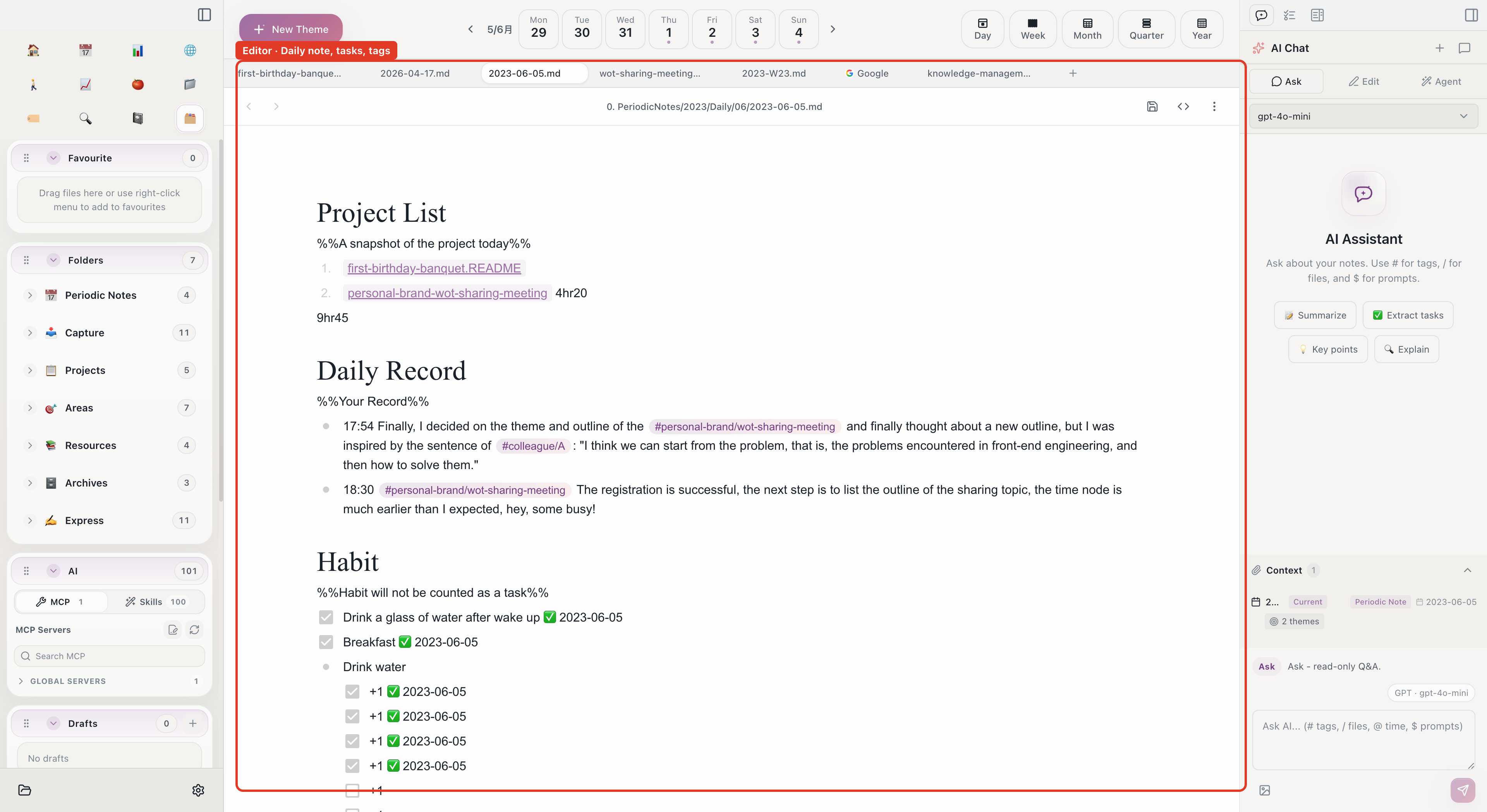
Why many “AI note apps” remain chat apps
The first AI summary of a note often feels magical. But continue with questions such as “Where does this project stand?” or “What deserves my attention this week?” and the answers soon become vague.
The problem is not always the model. It is the context.
A generic chat panel does not know:
- which files belong to an active project and which are only references;
- whether a record comes from today, last week, or an outdated year;
- which tasks are genuine next actions and which are passing ideas;
- how weekly notes, project indexes, and daily notes relate;
- where a change belongs, which template to use, or which naming rule to follow.
Sending the entire vault to a model does not solve this. More context also means more noise, and the AI still does not understand how the system operates.
My conclusion is simple: AI needs more than text. It needs durable context with coordinates, boundaries, and rules. LifeOS already provides that foundation.
What I prepared for AI with LifeOS
I have always built LifeOS around two systems.
Periodic notes place daily, weekly, monthly, quarterly, and yearly changes on a timeline. When AI needs to understand what happened recently, it can follow an explicit date range instead of guessing across every file.
Topic notes give every project, area, resource, and archive a thematic coordinate. When AI needs to advance a project, it can begin with the project index, related tasks, and recent records instead of treating the whole vault as undifferentiated text.
Tags, links, tasks, and templates connect the two. Notes become data with time, topic, state, and operating conventions.
Without LifeOS, AI must first reverse-engineer how your notes are stored. With LifeOS, it can begin to understand what you are doing.
How AI enters the workflow in Aino
In Aino, I organize this system as AI Q&A, AI Summary, AI Review, AI Organize, AI Apps, and AI Agent. They may look like six separate features, but they form one workflow: understand the context, compress information, organize material, review outcomes, and finally generate a purpose-built tool or take action.
1. Context enters with the task
I designed several explicit context entry points in Aino’s right sidebar: # selects tags, / selects files, @ selects a date range, $ loads a Skill, and ! selects a prompt. The current note, current web page, and manually attached material can also become context for the current run.
This is deliberate. AI should not permanently see the entire vault. It should receive the right material for a specific task.
For example:
- “Use
@to select the last 7 days, then organize completed, delayed, and potentially blocked items.” - “Combine
/Website Redesign.mdand#user-feedback, then propose the three assumptions most worth testing next week.” - “Read the current web page and project note, then turn the useful ideas into a sourced research entry.”
Once context is selected from the LifeOS timeline and topic network, the question becomes part of your real work.
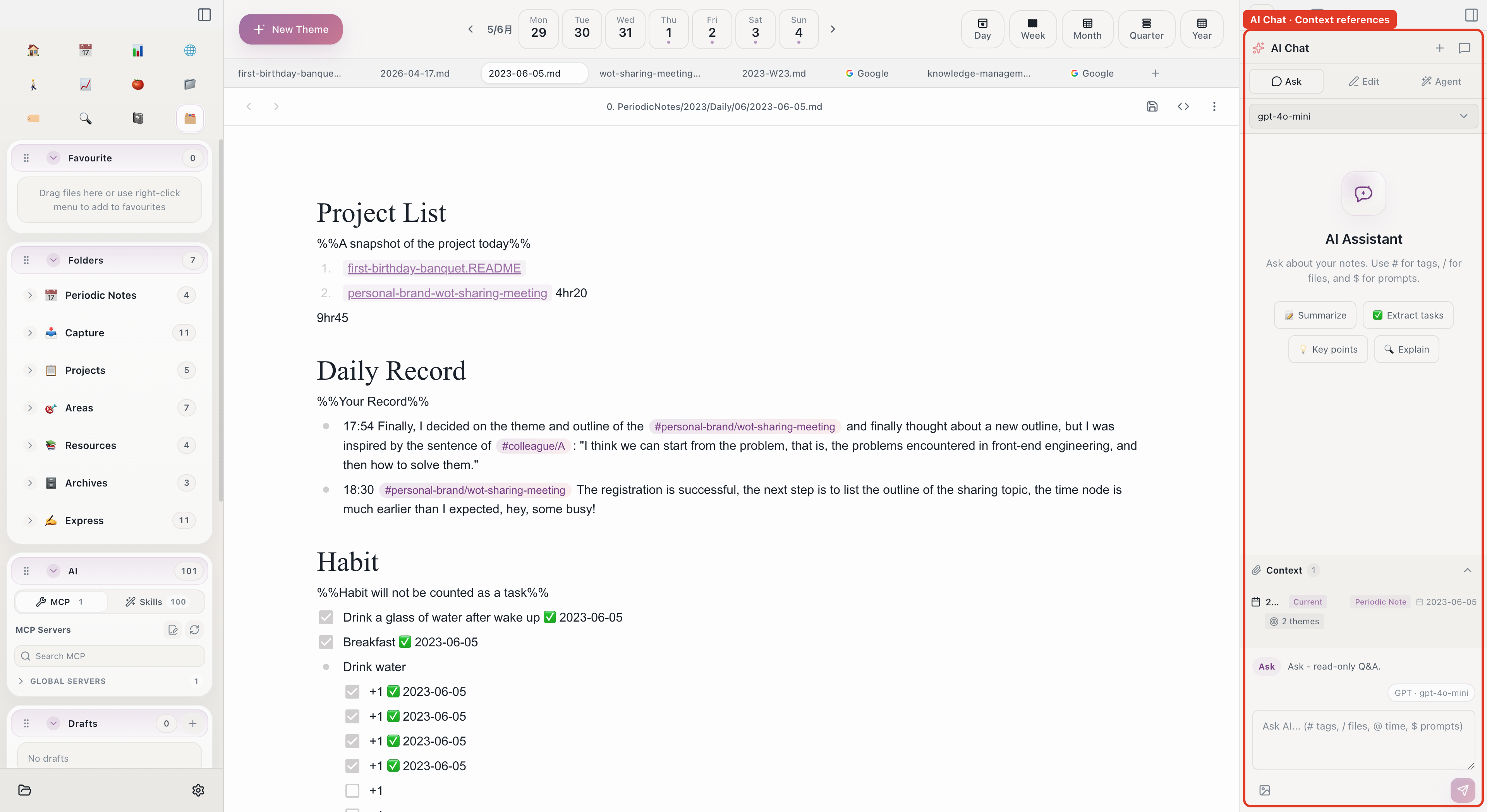
2. AI summaries are entrances, not endpoints
Summarization is the most familiar AI capability, but Aino does not limit it to one open article. You can summarize a long document, a group of project materials, a clipped web page, or periodic records from a date range, then extract key ideas, decisions, and next steps.
You can continue the conversation, copy the result, or export it as Markdown. When it belongs in the vault, write it into a topic note or project index, or pass it to Edit mode to generate reviewable tasks and changes.
This also separates a summary from a review. A summary asks, “What do these materials say?” A review combines goals, actions, and outcomes to ask, “What happened, why did it happen, and what should change next?”
3. From asking to editing to agent execution
I divided AI into three modes with progressively greater capability:
- Ask is read-only and supports summarization, explanation, comparison, and analysis.
- Edit proposes changes to the current or related notes and requires confirmation before applying them.
- Agent can search across files, create and update content, and call MCP tools or local agents for multi-step work.
These modes represent different levels of trust. Let AI understand first, propose changes second, and only then delegate a complete workflow.
4. AI Workbench turns a conversation into a persistent workspace
Chat context naturally fades when a conversation ends, but a real project may last for weeks or months.
AI Workbench creates a workspace around a project, task, topic, or output. Project indexes, key tasks, long-lived references, and primary outputs persist as workspace material. Files, dates, and web pages attached in the right sidebar remain temporary for the current run.
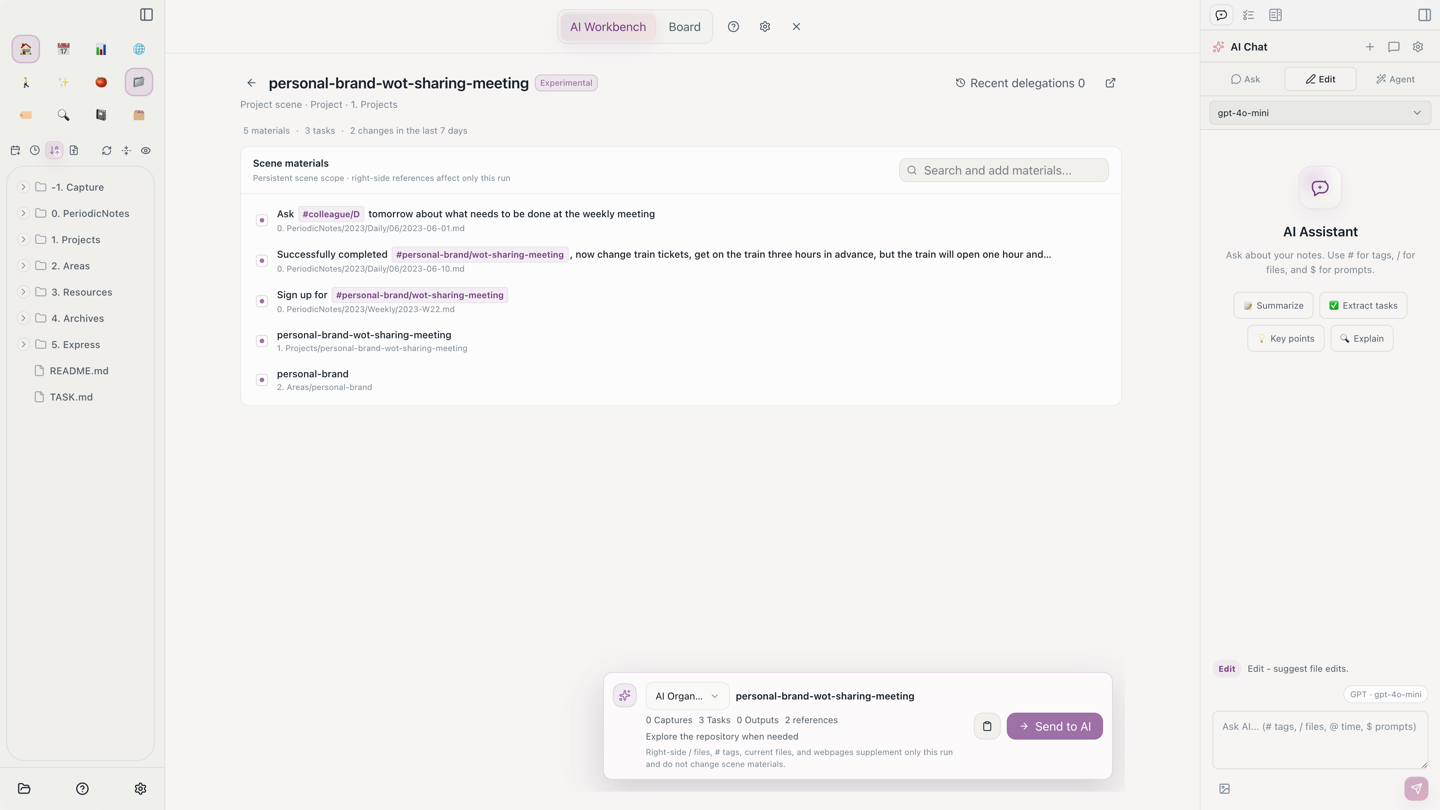
When you delegate “Organize,” “Generate next steps,” “Check blockers,” or “Generate output,” AI reads the workspace first and explores elsewhere only when necessary. The receipt then shows what it actually read, which files changed, and whether it discovered useful material outside the workspace.
AI Workbench is still experimental, but it represents an important principle: AI should not merely remember chat history. It should return to the work object itself.
5. Skills teach AI how LifeOS works
File access alone is not enough. Even an agent that can see the entire vault may not understand periodic-note paths, topic templates, task syntax, or review sections.
I expressed these methods as executable rules in the LifeOS Skill. Aino reads the real settings of the current vault, so AI knows what your PARA folders are called, where daily notes live, how templates render, and which checks must happen before a write.
You can then say:
A Skill is not a collection of polished prompts. It turns a method into a stable, reusable, and inspectable operating protocol. The same LifeOS rules can guide Aino’s sidebar, Claude Code, or Codex.
6. Organization and review remain part of the same system
In LifeOS, I have always emphasized “capture first, organize later” and periodic review. With Aino, I placed AI inside those existing moments.
AI Organize first selects candidates from capture folders, topic notes, or periodic records, then hands an explicit scope to the agent. AI can propose summaries, tags, merges, or moves. Whether later changes enter an editor diff or run through Agent permissions depends on the active Edit / Agent mode and authorization settings.
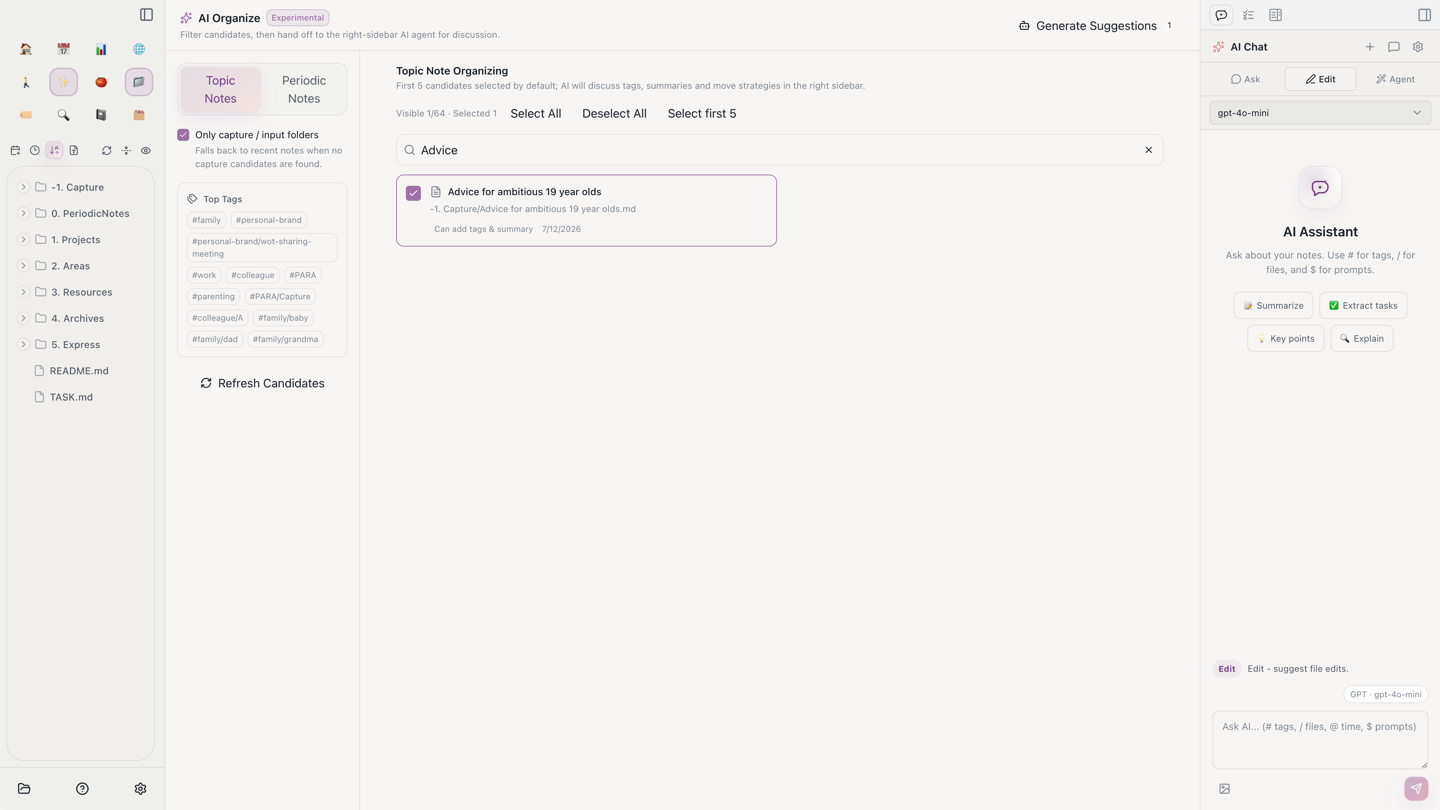
AI Review starts from the current period with bounded evidence: due and actually completed tasks, active notes, periodic notes, inferred projects, and habits. The Agent then analyzes progress and possible blockers. You can continue discussing and republish the report. Once it is confirmed, ask the Agent to write a review note or create next-period tasks; every write first shows a change preview.
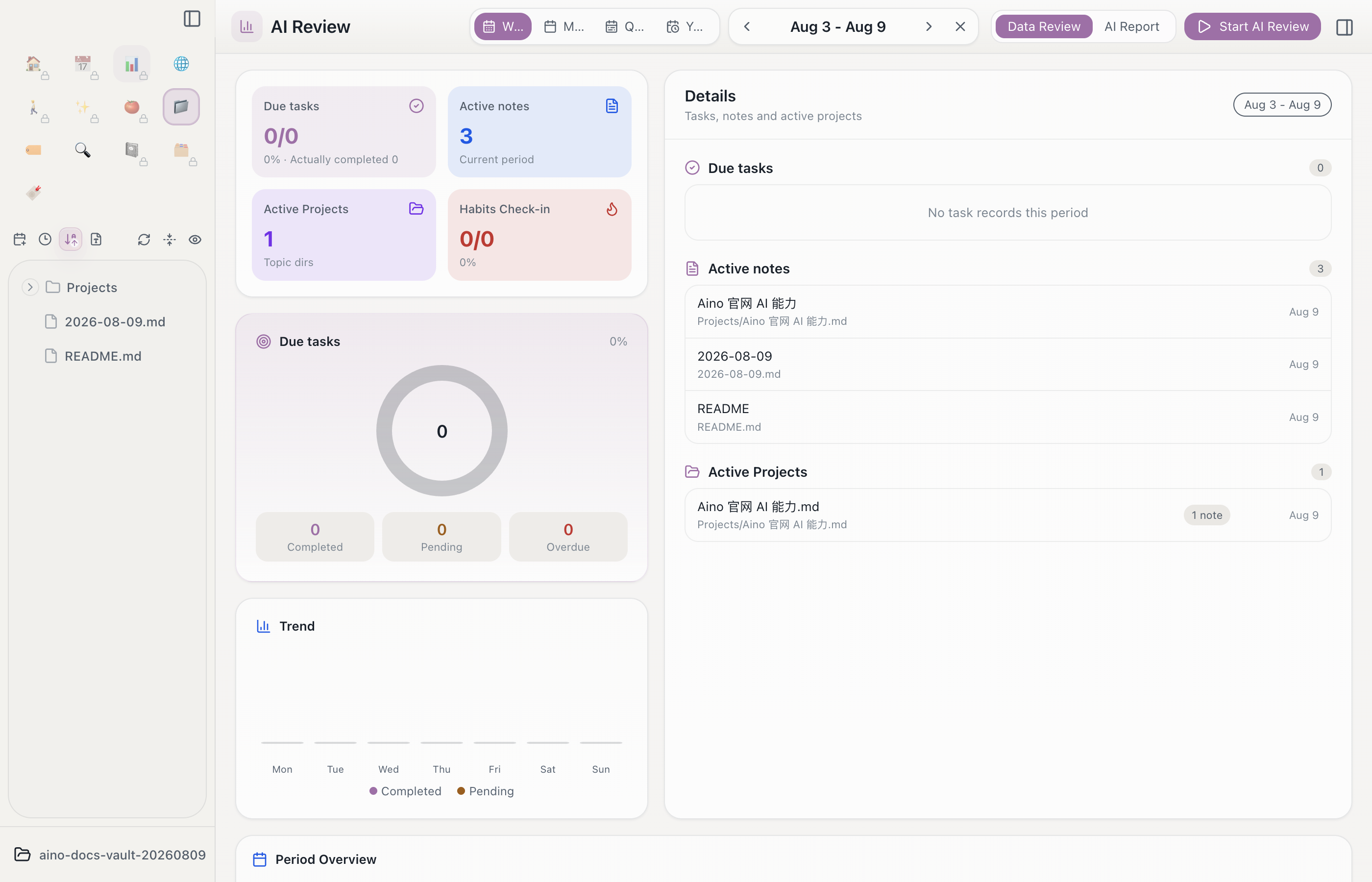
AI is not producing a disconnected summary. It works inside the organization and review rhythm that already exists in LifeOS. Today’s records enter a project, this week’s changes enter the weekly note, and recurring monthly issues become input for the next plan.
7. AI Apps let Markdown grow a purpose-built interface
LifeOS already turns a great deal of information into Markdown with tags, frontmatter, sections, and relationships. The interface each person wants is still different: one person needs a client follow-up desk, another needs a project cockpit, and someone else wants a view for reading, habits, or content publishing.
I added AI Apps to Aino so you can describe the need directly. AI first confirms the purpose, data source, record format, and read/write behavior. It then generates HTML, CSS, JavaScript, and a Markdown data contract. Aino previews example notes and waits for your confirmation before saving source or sample data. The generated source must pass host validation and runs inside an isolated sandbox.
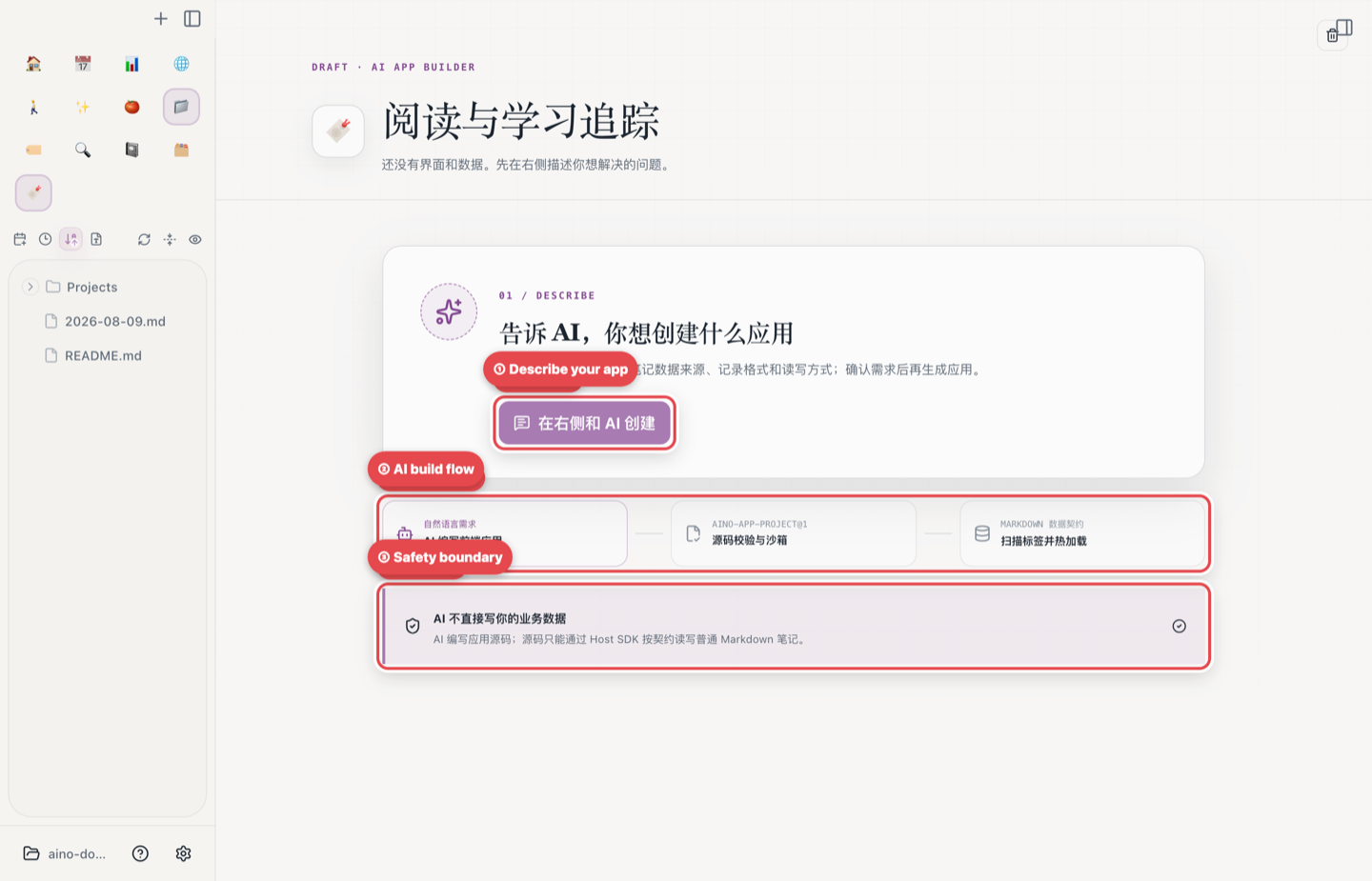
For example:
AI generates the interface while the business data remains ordinary Markdown. The app can read and write only through Aino’s Host SDK and the confirmed data contract; it cannot access the network freely. If you stop using the interface, the original notes remain readable, searchable, and portable.
AI Apps are also experimental. They push the LifeOS–AI connection further: AI does not merely read or edit existing notes; each personal workflow can gain a purpose-built interface on demand.
8. The final control must remain human
Once AI can operate on notes, the important question is not only whether it can make changes, but whether you can understand those changes.
In Edit mode, and in preview-gated workflows such as AI Organize and AI Review, Aino renders additions, deletions, and rewrites as editor diffs. You can accept or reject them by file or by chunk. Whether a regular Agent or local CLI agent writes directly depends on the active mode and the permissions you grant; writes, deletions, and MCP tools retain separate permission boundaries, with review or undo paths where applicable.
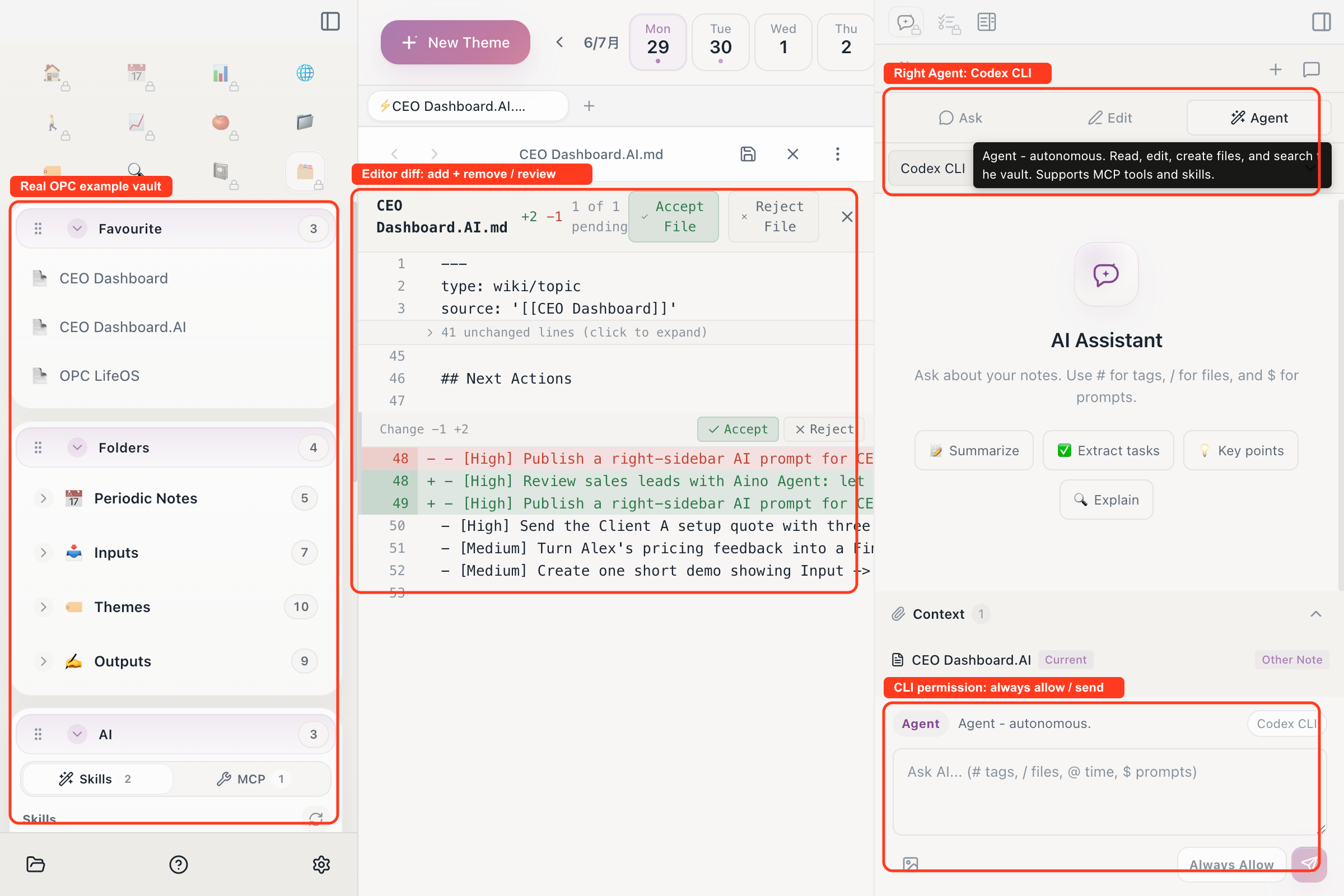
The goal is not “delegate it and forget it” automation. It is lower-friction collaboration: AI searches, synthesizes, and executes; the human owns goals, judgment, and final approval.
A complete example: advancing a website launch
Suppose I am running a four-week website redesign.
Meeting decisions, user feedback, and passing ideas first enter daily notes. Clear actions become tasks and connect to “New Website Launch” through the project tag. Web research enters local Markdown through Aino Web Clipper, and important sources are added to the project workspace.
Midweek, I open the project in AI Workbench and delegate three tasks:
- Explain current progress from the project index, recent journal entries, and tasks.
- Find items without owners, next actions, or recent updates.
- Propose the most valuable actions for the next three days.
If the conclusion is sound, I switch to Edit mode and ask AI to update the project index. Aino shows a diff and I accept it chunk by chunk. When external data is needed, the agent can call an explicitly enabled MCP tool. Complex cross-file work can go to local Claude Code or Codex.
At the end of the week, I start AI Review. Aino follows the weekly date range to assemble evidence from due and actually completed tasks, active notes, projects, and habits. The Agent then analyzes delays, possible blockers, and new discoveries. I add what only I can know: why something slipped, which decision was wrong, and what must be abandoned next week. After confirming the report, I ask the Agent to write it back to the weekly note and add new actions to the project and task system, reviewing the change preview before anything is applied.
The result is a loop:
Models may change and tools may grow, but the project, records, decisions, and outcomes remain in your own LifeOS.
Local-first matters even more in the AI era
I have kept Aino local-first: it stores notes as local Markdown in a folder you choose, opens an Obsidian vault directly, and does not require the entire knowledge base to move into a proprietary cloud format.
For desktop AI, you configure your own model API, compatible endpoint, Ollama, or local Claude Code / Codex. I did not design Aino to upload the entire vault to a model by default. Each request sends the current note or web page that is visible or enabled, manually selected material, conversation history, and the system instructions and Skills required for the task to the provider or tool you chose. In Agent mode, file tools, MCP servers, or local CLI agents you authorize may also read other files needed for the task and send necessary tool results to the selected model or service; a Workbench scene is priority context, not a security sandbox. Aino does not provide hosted desktop AI inference by default.
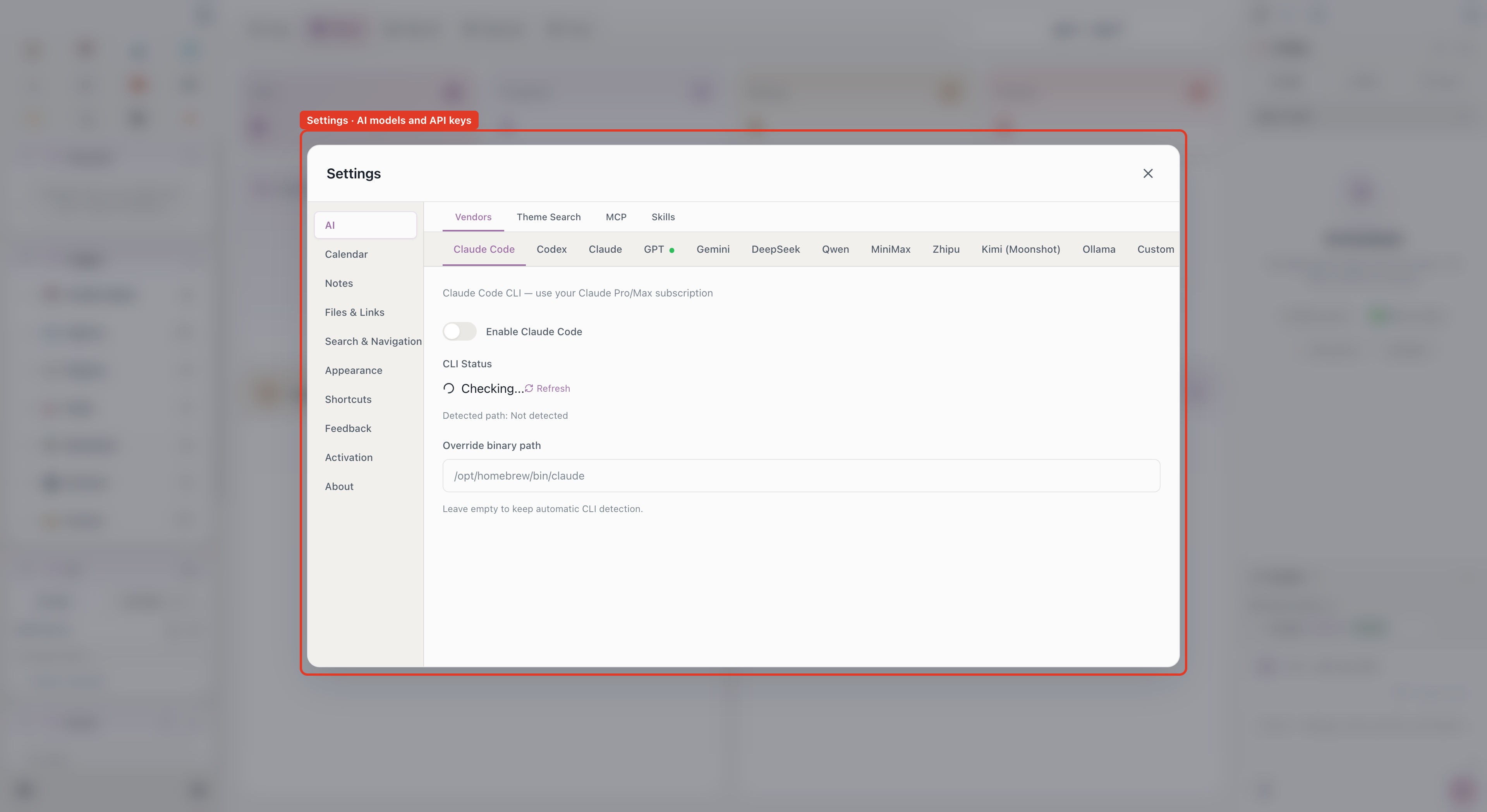
Local-first does not mean refusing the network. It means keeping the location of your data, the model choice, and authorization boundaries explicit. If you switch models or stop using Aino, the Markdown files, directory structure, and LifeOS workflow still belong to you.
Aino does not need to replace Obsidian
I first built LifeOS on Obsidian, and I still value its plugin ecosystem and flexibility. Aino and Obsidian can open the same vault:
- use Obsidian when you want its community plugins and deep customization;
- open Aino when you want AI to understand and advance work using LifeOS rules;
- keep working with the same Markdown files without importing between closed systems.
I see Aino as a new interface for LifeOS in the AI era. It preserves the timeline, topic system, and local files, then turns that accumulated structure into durable context AI can actually use.
How to begin
If you already have a LifeOS or Obsidian vault, open it directly in Aino. Otherwise, begin with a Memos, IPO, GTD, PARA, or OPC example vault.
I recommend a gradual path:
- Use daily notes and one real project for a week so the system contains genuine context.
- Configure a model, compatible endpoint, or local CLI agent in Settings → AI.
- Install the LifeOS Skill in the right sidebar and begin with read-only questions.
- After AI understands your structure, try Edit mode and review the diff.
- Only then delegate multi-step work through Agent, AI Workbench, or MCP tools.
Do not begin with the goal of letting AI manage everything. First make the note system reflect your real work, then delegate the repetitive, mechanical, and inspectable parts.
Closing thoughts
Three years ago, I described the second brain as a cache between the first brain and the real world. It preserved context so I could focus on the present.
That cache can now understand and act, but I do not want it to replace the first brain. The important change is that when I return to a project, a review, or a long chapter of life, AI no longer faces a blank page and I no longer have to explain everything again.
LifeOS turns experience into durable, structured context. Aino lets AI work inside that context.
The second brain prevents forgetting. The AI work system turns memory back into action.
Start with Aino
Turn this approach into your everyday workflow
Try Aino Desktop Pro free for 7 days, open an existing Markdown vault, or start with the complete example vault from your email.
- 7-day free trial
- Portable Markdown
- Complete example vault by email